


What are distributors building with AI?
Independent distributors run lean by necessity, so every hour spent on repetitive, manual work is time not spent on selling, serving customers, or making real business impact.
That’s why independent distributors are not waiting for tools to become available in the market or for IT to build what they need. Now, they’re building it themselves and automating workflows using AI.
From an AI assistant that briefs you on your week ahead to a USDA dashboard that tracks live commodity prices, it’s never been easier to build AI agents that do the heavy lifting. For the first time, small teams can move just as fast and efficiently as the big ones.
The best part is that they’re doing it without the big guys' budget or writing a single line of code.
This guide is designed for independent distributors and includes step-by-step instructions to help you get started building four AI tools. No AI-building experience required. The first two are listed in this blog.
- Weekly briefing assistant - Prep for the week and draft responses to important messages.
- USDA data dashboard - Monitor commodity price trends in a custom dashboard.
- Food show marketing website - Create a polished marketing site for your upcoming food show (download the full guide).
- Sales training agent - Train your reps on cold calling and selling best practices through live conversations (download the full guide).
Want access to tools #3 and #4? Download the full guide here.
These are the tools you’ll need to get started
You can get started with any publicly available AI tool in just a few minutes. Many of these offer free or low-cost plans. Here are a few tools we reference in the full guide:
- Claude - Claude Cowork is an easy starting point. Free and paid plans available; connector capabilities (Gmail, Slack, etc.) require a paid plan (around $20/month)
- Gemini - Best for Google Workspace users; already has access to Gmail and Drive
- Copilot - Best for Microsoft shops with Outlook and Teams
- ChatGPT - Works well with the right connectors enabled
- Lovable - Great for building apps and websites. Free and paid plans available; the free plan gives 5 domains to start.
- ElevenLabs - Create an account and start building voice agents. Free and paid plans available; the free plan gives 15 minutes of call time.
From here, you’re not just asking AI questions; you’re building tools that help streamline tasks and give time back, so you can focus on growing the business.
Tool #1: A Weekly Briefing Assistant
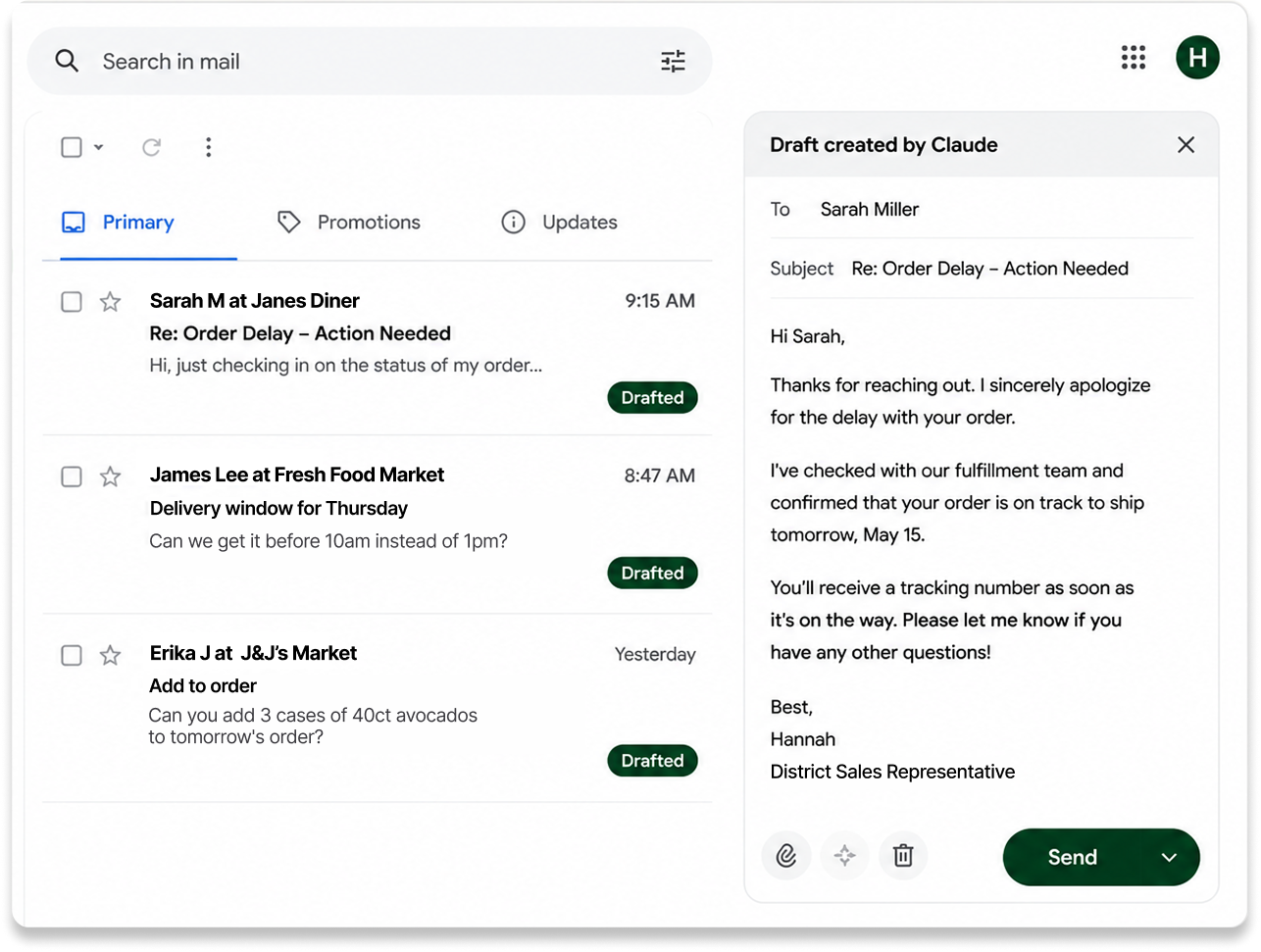
Spend most of your day going through your messages? Build a digital executive assistant that surfaces urgent messages, drafts responses, and schedules tasks automatically so you won’t have to spend hours reading and sorting through manually.
Tools Referenced: Claude Cowork (or ChatGPT, Gemini, Copilot, etc.)
Steps:
- Connect your internal tools. Claude Cowork lets you link your Gmail, Outlook, or Slack account in a few clicks.
- Describe the task. Paste this prompt:
“You’re my digital assistant. Go through my emails in my inbox, create an executive summary, and draft responses to the urgent emails or anything needing attention today. Do not send without my approval, and prioritize emails related to customers, orders, and questions being asked.”
Or try it yourself: Every good prompt follows this 3-part structure.
- Tell the AI who to be. What is their role?
- Present the task. What’s the end outcome? What steps would you take to get there?
- Give background context. What’s the goal? How would you define important or urgent messages? Any other guidelines?
- Let it run. The model scans an inbox, categorizes messages into fires, revenue opportunities, and low-priority items, and drafts responses to the ones that need attention.
- Customize the agent. Adjust the tone to match your voice and schedule it to run weekly.
Tool #2: USDA Data Dashboard
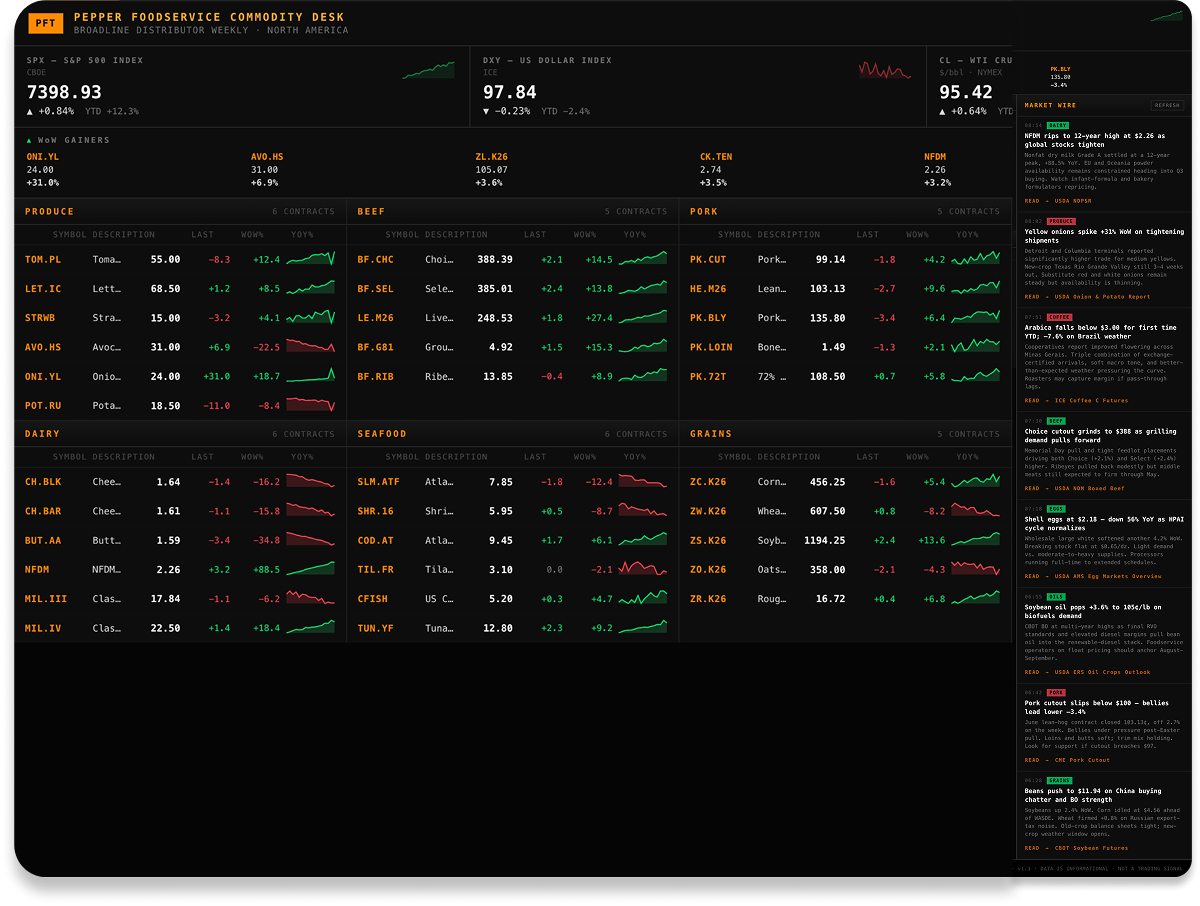
Stay on top of commodity prices with a live dashboard that pulls in USDA market data and updates every week.
Tools Referenced: USDA MyMarketNews API, Claude Cowork (or ChatGPT, Gemini, Copilot, etc.)
Steps:
- Connect the USDA data feed. Go to the USDA MyMarketNews site here and follow the instructions to connect the MyMarketNews API.
- Build the dashboard. Open Claude and paste this prompt:
“Build me a Bloomberg-terminal-style weekly commodity price dashboard for a broadline foodservice distributor. Cover produce, beef, pork, chicken, turkey, eggs, dairy, seafood, grains, oils, and coffee/sugar. Use only free public data sources (USDA AMS, FRED, BLS, NOAA Fisheries). Make it a Cowork artifact with a scrolling ticker, macro band, category grid, and news sidebar.”
- Customize it. Pick the 3-5 categories most relevant to your business and iterate in plain English. For example:
"Add a lamb category with carcass, loin, leg, rack, and ground. Add hover tooltips to the macro indicators with definitions and sources. Add a Top Movers panel showing the 5 biggest WoW changes across all categories."
- Schedule the dashboard to refresh weekly. Use this prompt:
“Set up a weekly scheduled task that refreshes this dashboard every Monday morning using free public data, and update the artifact when it runs.”

Frequently Asked Questions
How can AI help independent food distributors compete?
AI helps cut down on manual workflows across the business, so you have more time to lean into strategy and growth. The tools in this guide are a starting point to help automate the repetitive processes.
How do I get started using AI in my distribution business?
Start with any publicly available tool like ChatGPT, Claude, Gemini, or Copilot. Pick one task to automate first, like summarizing weekly messages or tracking commodity prices. Both are covered step-by-step in this guide.
What AI tools should I get started with in my distribution business?
This guide walks through four AI tools distribution businesses are building today:
- Weekly briefing assistant - Prep for the week and draft responses to important messages.
- USDA data dashboard - Monitor commodity price trends in a custom dashboard.
- Food show marketing website - Create a polished marketing site for your upcoming food show (download the full guide).
- Sales training agent - Train your reps on cold calling and selling best practices through live conversations (download the full guide).
The first two are covered step-by-step in this blog. Download the guide for a full walkthrough.
How can AI help distributors manage internal and customer communication?
Distributors can manage internal and customer communication by building a weekly briefing AI assistant. It scans your inbox and messaging tools like Slack, flags urgent customer or order-related messages, and drafts responses automatically, so you can spend less time sorting through your messages manually.
How do distributors track commodity prices with AI?
Distributors can track commodity prices using AI by building a live data dashboard that pulls free public data from USDA and updates automatically every week.
How long does it take to build distributor tools with AI?
Most distributors can start building these AI tools anywhere between 30 and 60 minutes, following the steps in this guide.
What's the difference between asking AI questions and building an AI tool?
Asking AI questions gets you a one-time answer. Building an AI tool creates something that runs on its own. For example, a briefing assistant that drafts responses every morning, a dashboard that updates every week without you re-prompting it each time.