


Nobody buys a case of anything from a blank white square - Product content is the difference between an operator finding an item and calling their rep, or calling somebody else.
And while everyone understands the importance of product content, getting (and keeping it updated) is the hard part. Some comes from your ERP, where it was entered to serve inventory and accounting, not merchandising. Some comes from suppliers and syndicated feeds, in whatever format they happen to send, and much of it sits in Pepper's content library, waiting to be connected to the item you actually carry.
Content Hub puts that work in one place. Matching, editing, bulk changes, image generation, and all of the tools you need to create a product library customers want to shop.
The Problem: Messy Data, Difficult to Match to Pepper’s Content Library
Every distributor's catalog is a blend, but no two distributors want the same blend.
Your ERP has the item code, the pack size, the price, and a product name somebody typed in 2014 to fit a 30-character field. It's authoritative because it's what you buy and sell against, but it’s frequently unusable as merchandising copy.
Supplier and syndicated feeds carry richer material: brand names, marketing descriptions, spec sheets, photography. Coverage is uneven, though; a feed that's excellent for center-of-the-plate proteins can be nearly empty for your JanSan line.
Even more, Pepper's content library can connect to any distributor - normalizing product content across by reaching out directly to suppliers to build our catalog of 14 million item attributes for any distributor to take advantage of.
The hard part isn't gathering these sources, It's arbitrating between them, field by field, forever. A distributor with a well-maintained ERP wants their own item names to be displayed in their storefront (those names are what their reps say out loud and what customers search for), but will need help adding images and nutritionals. On the other hand, an importer whose descriptions are their actual competitive advantage wants every word of those kept, and none of their internal item shorthand exposed.
Content Hub, The All-In-One Content Management Platform for Distributors
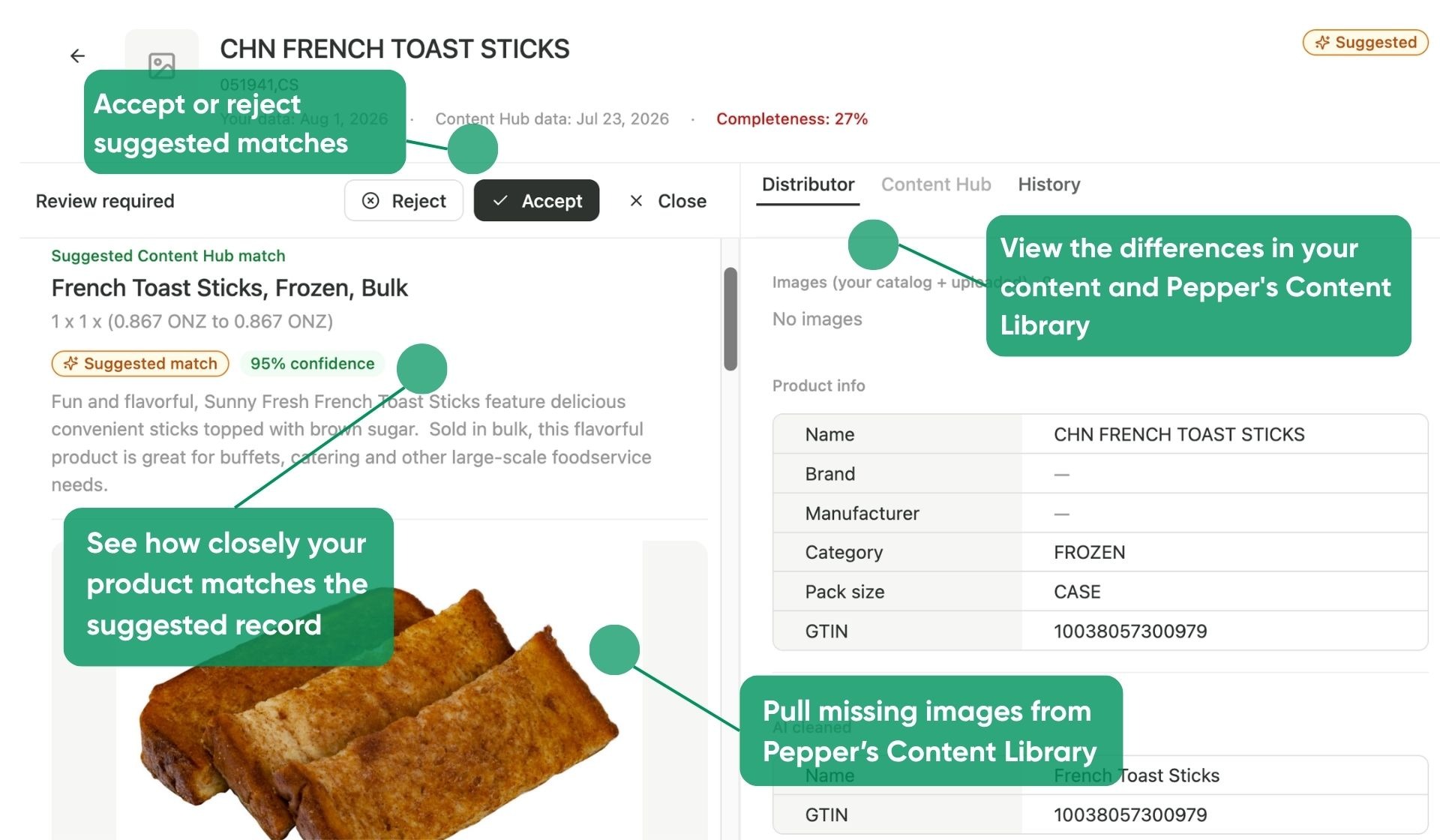
Content Hub’s matching algorithm is able to match distributor products to our content library based on GTIN, item name, description, and images - with a confidence metric to let users know how likely the product is to match.
Going into an individual item shows several pieces of information:
- Item Images and Metadata Include the information that customers will notice first - the item images, its name, and its readable description, alongside any nutritional information or spec sheets you include
- Distributor Item Information is the information housed within your in-house ERP or data feed that you have outside of Pepper
- Content Hub Item Information will show the total information that is housed within Pepper’s content library
- Reject/Approve gives the user the ability to either match the product to the product listed in Pepper’s product library or ‘reject’ the match and only keep the detail kept in the ERP
- Item history is a record of who made edits to the product, and when
The nuance is in the near-misses. Say a distributor carries an item with a match to Content Hub, but they have customer-ready item descriptions in their ERP (or available in a data source). How can they take certain information from Content Hub, while prioritizing the data that they’ve invested in?
Your Catalog, Your Way
Prioritizing the Right Information
The Settings are potentially the most consequential part of Content Hub, because it's where you determine what information is displayed to your customers.

Set source priority per field like product name, images, or description to decide for each whether your ERP leads with our library as fallback, and whether your manually uploaded images take precedence. Set it once and every match that lands afterward respects those rules.
Speak Your Customers’ Language
For distributors with a more diverse set of customers, Content Hub also has the capability to translate your product catalog into different languages. Simply add locales or languages to make your catalog readable by everyone
Getting Started
Nothing about your existing product content changes. Your images and descriptions come from the same places they came from yesterday.
What changes is that the tools for managing all of it now live in one place, behind permissions your admins control, so the person who actually owns merchandising can do this work without an admin account and without a tour of five different screens.
Interested in getting started with Content Hub? Find out more on how to use it here, and reach out to your CS representative to get started!


.png)