May 5, 2026
April 2026
In this edition: Price editing in sales rep order entry, automated customer marketing campaigns, gated promotions, and more
.png)
End-to-end Order Entry Coverage

The Sales Rep Order Entry page now includes price editing fields and live commission visibility for customers that currently have commissions visible in the app for sales reps. Reps can view and edit pricing and margin data directly in the item grid, with commission totals updating in real time as the order is built.
The order entry module is also much easier to use with customers. Reps can adjust the order and visibility of columns to their own preferences, saved to their device, and the sales rep toggle (a new eye icon in the top right) hides gross profit and other sensitive cost information when reps are working in front of customers.
Availability
Price editing and Order entry are available for enterprise sales hub packages
Automate Marketing Campaigns and Engage Customers with Operator Outreach

Keep your customers in the app, and never miss an order again! Distributors can now automate customer communications through email and app messages with Operator Outreach, available to all storefront customers. The tool runs four independent campaigns, each with customizable messaging, configurable timing, and a message history log:
- Welcome / First Order: Sends a welcome email to new customers within an hour of their first order
- Abandoned Checkout: Sends an in-app chat message when a customer leaves without completing their order
- Auto-Reply Messages: Instantly replies to customers who message outside of business hours
- Lapsed Customer Winback: Re-engages customers who haven't placed an order within a configurable inactivity window
Availability
Operator outreach is available to all storefront customers.
Discount Code-Gated Promotions
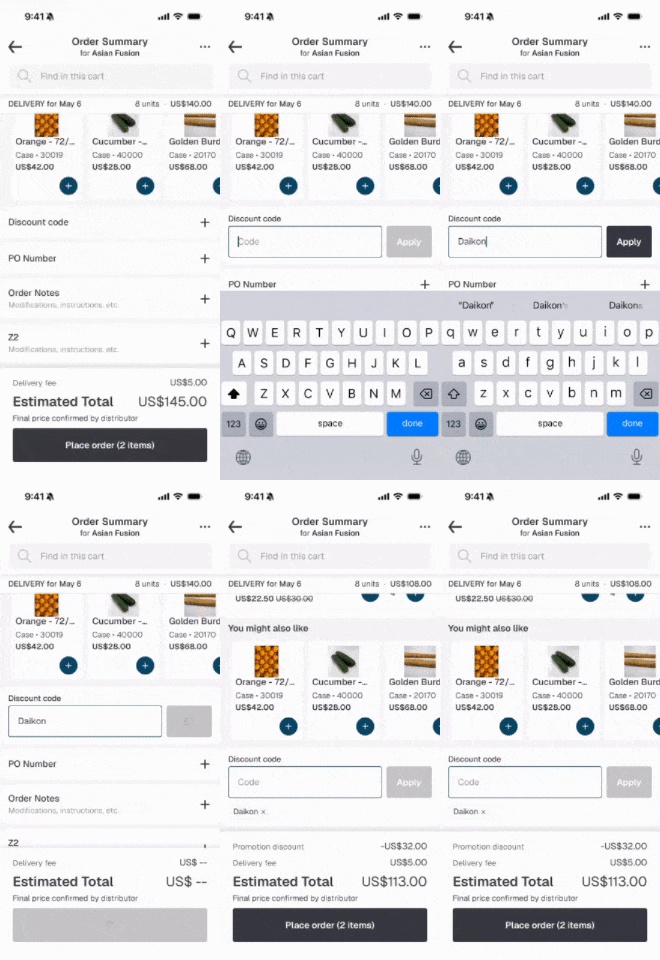
Distributors can now attach an optional discount code to any promotion.

Operators enter the code at checkout to unlock the discount, giving distributors a way to tie off-platform efforts like trade shows, DSR outreach, and email campaigns to on-platform redemptions. Redeemed codes are captured in order exports for downstream attribution.
Availability
Available to all Storefront packages
Require Payment Method to Place Orders

Distributors can now require users to have a saved payment method on file before submitting an order. If none is saved, the user sees a clear message and an "Add payment method" button that takes them directly to the wallet flow.
Availability
Available to all customers of Storefront and Finance Hub
Setting Default Order Guide Sort Order
Distributors can set a custom default sort order for their order guide instead of defaulting to alphabetical. If a user has already set their own sort preference, their choice is preserved. Contact your Pepper account team to configure.

Availability
Available for all Storefront packages
Manage Item Substitutions Directly in the Admin Console
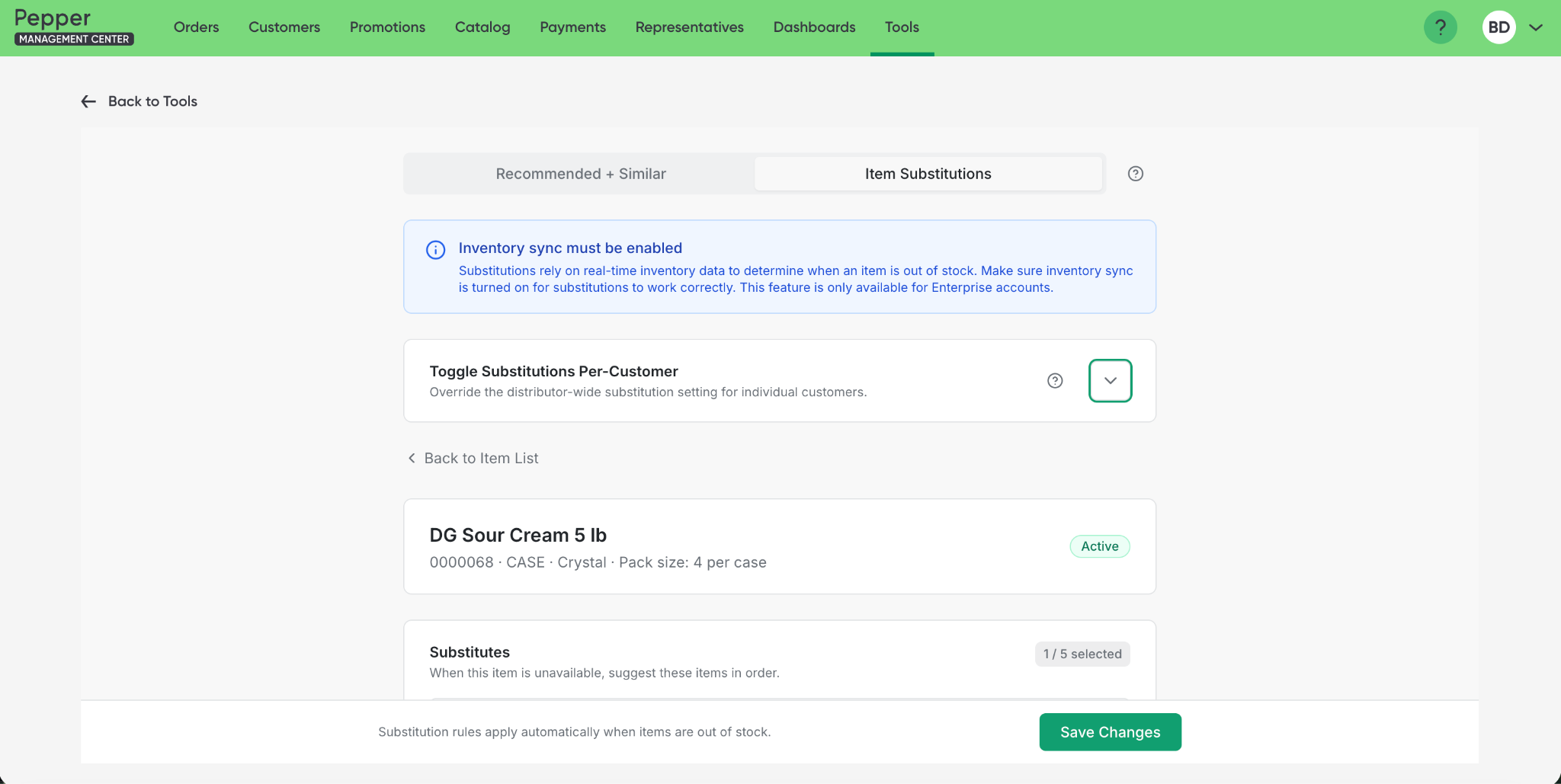
Distributors with item substitutions enabled can now manage substitution settings directly in PMC via the new Item Substitutions tab in the Item Connections tool. Admins can assign substitute items, configure substitution behavior, and toggle substitutions on or off per customer. Distributors whose substitutions are managed through an ERP integration will see a view-only version of the tab.
Availability
Available to all storefront customers with substitutions enabled. Customers with ERP overrides for substitutions will be able see, but unable to make edits.
Unlocking Whatsapp messages with Voice Memo Support (Order Agent)

Order Agent now accepts voice memo attachments - perfect for unlocking inbound orders through apps like WhatsApp. If a customer or sales rep attaches a voice note alongside their order, it will be transcribed and handled automatically. Supported formats include AAC, AMR, M4A, MP3, MP4, OGG, OPUS, WAV, and WEBM.
Availability
Voice memo support is available for all Order Agent users
Block Prepaid Cards on Terminal Transactions (Finance Hub)
Distributors can opt in to block prepaid cards from being accepted at the terminal. When enabled, the terminal runs a pre-authorization check and automatically declines prepaid cards at that stage, with a clear decline message shown to the delivery driver. Contact your Pepper account team to enable.
Terminal Support in Canada (Finance Hub)
The Castles S1F2 terminal is now available for Canadian distributors Reach out to your Pepper account team to get started.
Availability
Terminal updates are available for all Finance Hub packages
Photo Change History in Image Uploader (Storefront)

In Image Uploader, admins can now view a history of photo changes for any catalog item directly from the Item Details modal. Selecting Audit Logs displays a list of recent uploads, edits, and deletions, along with who made each change and when.
Availability
Image uploader audit history is available for all storefront and sales hub packages.
Change Item Badge Ordering

Admins can now control the order in which badges appear across the catalog using a drag-and-drop ranking page in PMC. Badges are ordered alphabetically by default, but the ranking page lets admins promote high-priority badges so they surface first wherever badges are displayed. Find it under Catalog > Badges in the admin console.
Availability
Sorting item badges is available to all Storefront customers.